Everything you need for expiry dates.
From delivery to sale, every date you scan is tracked.
Scan it once.
Scan the barcode, then add the date. Type it, or take a photo. Vigil remembers the name and price next time.
One list every morning.
It shows what to take off the shelf, what to reduce and what to check. Staff tick each item when it is done.
Your discounts, applied automatically.
Set your discounts once and confirm them. Vigil works out each new price on the right day, even when nobody has the app open. Staff put the sticker on.
Bread30% off2 days before50% offon the day
Chicken30% offthe day before50% offon the day
Sandwiches50% offon the day
Past its use-by dateNever soldtaken off the shelf
Plan ahead.
See what goes out of date each day and how much it is worth. Plan a whole day's discounts in one tap.
Show customers your deals.
Make a poster for the window, share deals on WhatsApp, or show them on a TV in the shop. They update by themselves. With Vigil Pro, more poster designs with your logo, and customers can follow your shop: one tap tells them about today's offers.
A record of every check.
Every check, discount and removal is saved with a name and time. Print a report whenever an inspector asks.
Made for busy shops.
- No signal?It still works and catches up later
- The app in 29 languagesPolski · ગુજરાતી · اردو · Deutsch · 中文 and more
- Phone lockFace ID, fingerprint or the phone's passcode
- Any phoneWorks in any phone's browser; Android app coming soon
- More than one shopOne login for all of them
- Staff PINsEveryone signs in with their own PIN
- Your dataRecords stored in the EU. Download them any time
Try it with your own stock.
Free for 14 days, with everything included. You can try a sample shop first.
Start free for 14 daysFeatures
Everything a shop needs to stay on top of dates.
Scan each product once. Vigil watches the dates, tells your staff what to do each morning and keeps a record of it all.
1 · Scanning
Scan each product once.
Scan the barcode at delivery, then type the date or take a photo of it. Vigil reads the date and a person confirms it.
- Barcode scanner in the phone's camera
- Date read from a photo, always checked by a person
- Name and price remembered for next time
- Import your product list from a spreadsheet
- Warns about a barcode that doesn't check out, or a date that looks wrong
2 · Today
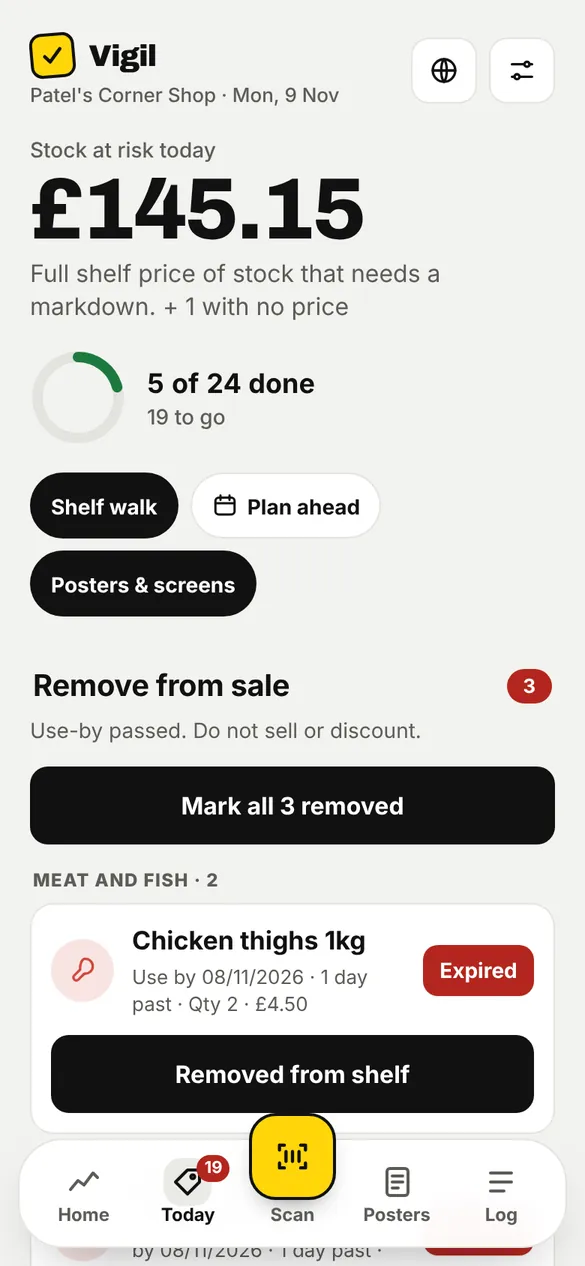
One list each morning.
What is past its use-by and must come off the shelf, what needs a new sticker and at what price, and what to check. Staff tick as they go.
- Take off the shelf: use-by passed, never discounted
- New stickers needed, with the price worked out
- Shelf walk: go aisle by aisle
- Morning reminder on the phone
3 · Plan ahead
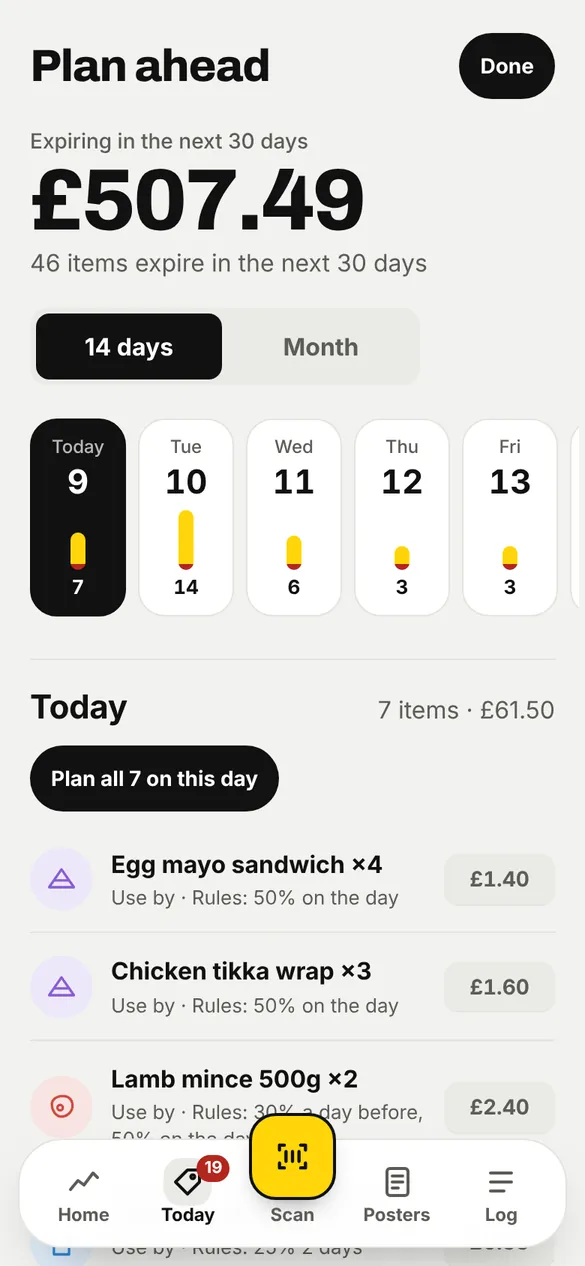
See what's coming up.
A calendar of what expires on each day, with its value. Plan the markdowns for a day in one tap, and they happen on the day.
- 14-day and month views
- Value at risk per day
- Plan a whole day's markdowns at once
4 · Markdowns
Set your prices once. Vigil does the rest.
Set the steps once and confirm them. Vigil works out each new price on the day, even when nobody has the app open. Customers see it once the sticker is on.
Per category
For example bakery 30% two days before, 50% on the day; meat 30% the day before, then 50%.
Per product
A product can have its own steps when it sells differently.
Times on the day
A deeper price from 6pm for bread, or whatever suits your shop.
Ask staff first
Prefer a person to decide? Switch automatic reductions off.
Never on expired use-by
Food past its use-by date never gets a price. It goes to Take off the shelf.
Never on age-restricted goods
Alcohol, tobacco, vapes, knives, energy drinks and baby formula are never reduced by a rule or shown to customers.
Smart discounts PRO
Learns the first discount that sells in your shop. More
5 · Customers
Tell customers about today's deals.
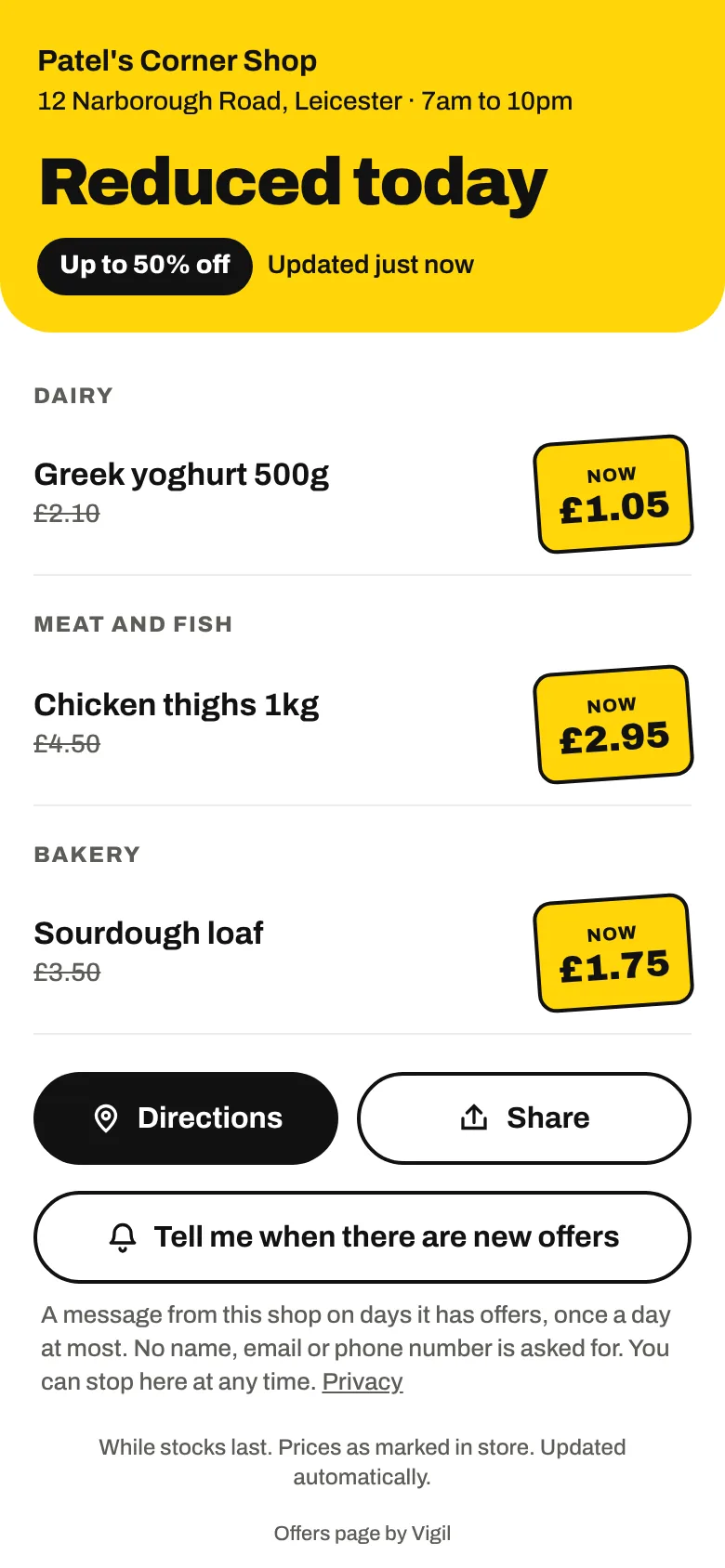
Reductions and your own deals on one page that updates itself. A QR code in the window opens it.
- Offers page for customers' phones
- Vigil Pro: customers follow your shop, and one tap tells them about today's offers, once a day at most (Android phones and computers)
- Vigil Pro: poster ideas for today, chosen from what you have on offer
- Today's offers poster in one tap: print it, save it or share it
- A QR sign for the window that opens your offers page
- Vigil Pro: the poster studio, with 10 designs and every size (window, phone post, story, shop TV, shelf edge), your logo and colours, occasions, a QR code on the poster and how many scanned it
- “Prices from our records” on the poster when every was-price comes straight from your records
- TV screen page for in the shop, with a countdown to the next price drop
- WhatsApp message of today's reductions
- Your own promotions: new stock, a deal, something that isn't selling
- Your food hygiene rating, if it is 4 or 5

6 · The record
Who did what, and when.
Audit trail
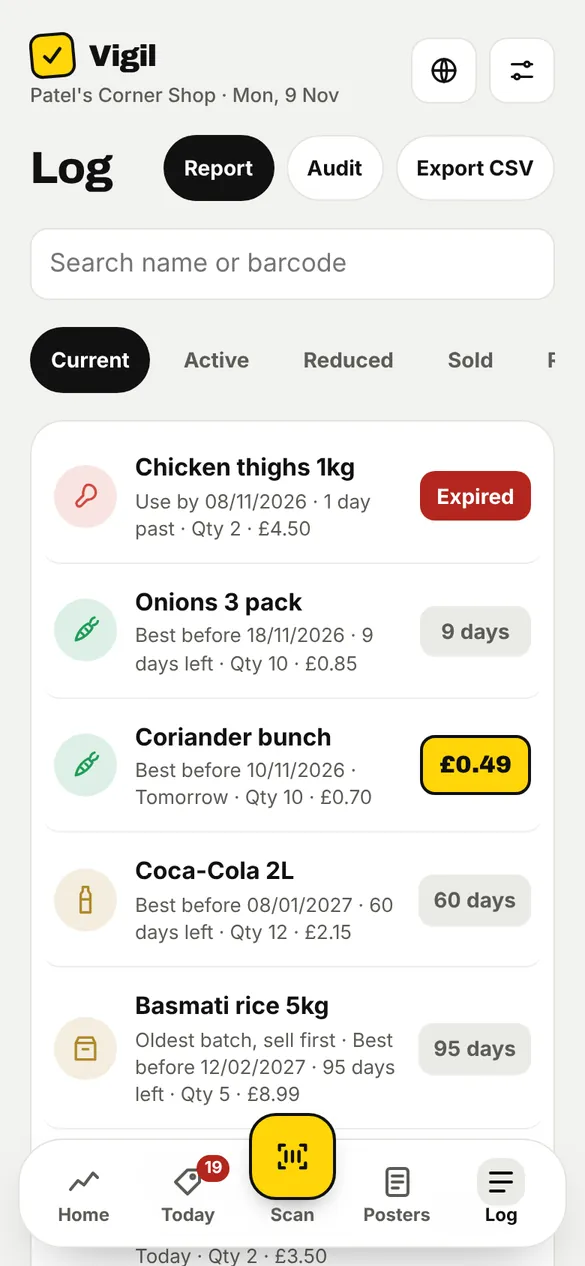
Every check, reduction, removal and settings change, with the person's name and the time.
Report for inspections
A PDF of checks and removals for any period, ready to print or show.
CSV export
All your records in a spreadsheet, whenever you want them.
Staff and roles
Each person has a name, role and PIN. Owners decide who can change settings.
Recall notices
Official food recall notices in the UK and the United States, checked against what you have.
34 countries
Vigil works in the UK, Ireland, most of Europe, Australia, New Zealand, the United States and Canada. Each shop gets its own country's currency, date rules and allergen list, and its offers page in the customers' language.
7 · Everyday
Built for a real shop floor.
Works without signal
Saves are kept on the phone and sent when the signal returns.
29 languages
The app in English, हिन्दी, ગુજરાતી, ਪੰਜਾਬੀ, اردو, Polski, Română, the main languages of Europe and Chinese (简体 and 繁體), chosen on each phone. The computer view has 23 of them. Your offers page and shop TV use your country's language. This website is in English.
Phone lock
Vigil can ask for the phone's Face ID, fingerprint or passcode when it opens, like a banking app. Set on each phone in Settings.
Every phone
Any phone or computer with a browser. The Android app is coming to Google Play.
More than one shop
One login, several shops. Switch between them in a tap.
Help in the app
Report a problem from Settings → Help, in any language. It tells us the screen you were on.
Stickers your till scans PRO
The reduced price is in the sticker's barcode, so a till that reads price barcodes charges it. Tested on Square. Which tills
Your data
Records stored in the EU. Date photos are read in the US and not kept. Yours to export or delete at any time.
Try a sample shop
Explore Vigil with a shop full of example stock before you scan your own. Remove it with one tap.
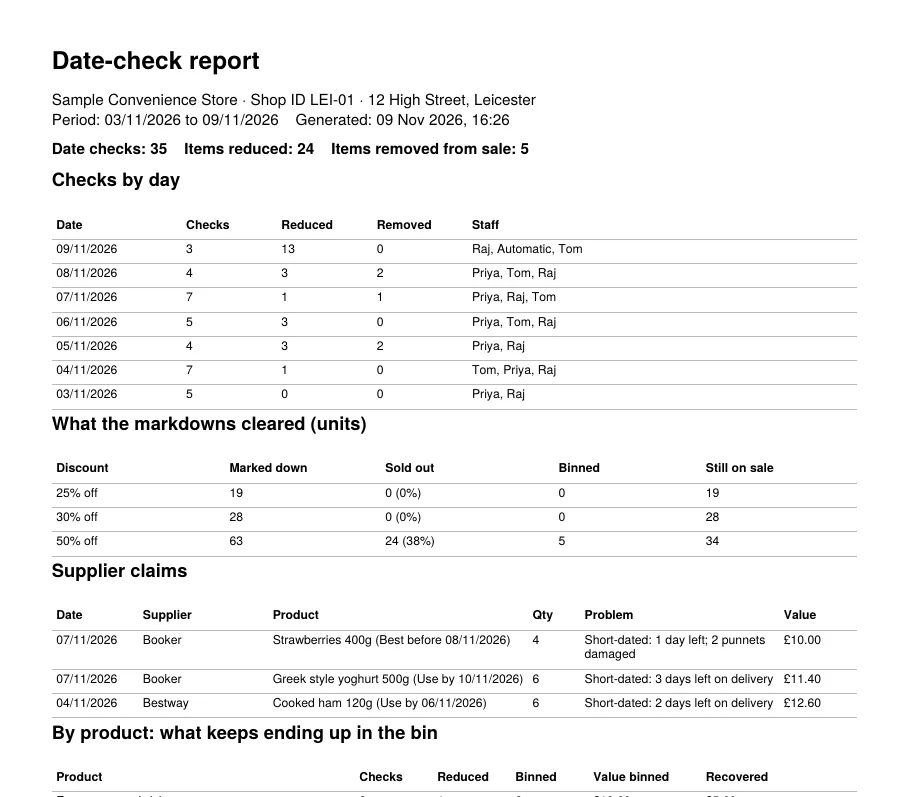
Ready when the inspector calls.
One tap makes a report of every date check, reduction and removal for any period, with who did it and when.
- Checks by day, with staff names
- What was removed from sale, and why
- What the markdowns cleared, and what was still binned
- Short-dated deliveries to claim back from suppliers
A made-up shop, but the real report from the app.
Pen and paper, a spreadsheet, or Vigil.
Here is what changes.
| Task | Pen and paper | Spreadsheet | Vigil |
|---|---|---|---|
| Finding short dates in time | When someone checks | If it is kept up to date | Every morning, on the list |
| Working out the reduced price | By hand | By hand | Done for you, on your rules |
| Use-by food past its date | Easy to miss | Easy to miss | Always on Take off the shelf |
| A record for the inspector | If the paper survives | On one computer | Every action, name and time, PDF |
| Telling customers | A sign in the window | No | Offers page, QR sign, TV, WhatsApp |
| Staff in their own language | No | No | 29 languages |
Try it with your own stock.
14 days free with everything. A sample shop is there to try first.
Start free for 14 days